
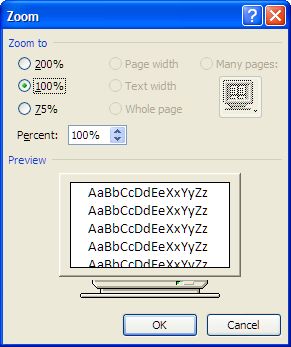
On my work computer, when composing an email in Outlook, suddenly the font size displayed larger than normal. I had this problem one other time, but couldn’t recall how to fix it. The fix is pretty simply.
In Outlook 2007, while composing a new email
Click on Format Text

Then Zoom

Then set the size to 100%.
Mine ended up on 200% – not sure how. So I reset it back to 100% and things are back to normal.
And now that I have added it here, when it happens again, maybe I’ll remember how to fix it.
Thanks for this fix – It solved the problem!!!!
Spent an hour or so trying to fix it a few weeks ago and gave up. I was even digging through the xml. Glad you posted this. Thanks.
Thank you! Thank you! Thank you! This was driving me crazy. I fumbled the keys trying to copy some text and ended up with enlarged text instead with no idea what I’d pressed.
Thank you for taking the time to post this. I had no idea what to do and I was going crazy! Thank you thank you!
Thanks you posted this. This was driving me crazy. Thanks again