


Category Archives: Tips

WiFi Network Problems – Try WiFi Stumbler


If you are having problems with your WiFi connection, such as dropouts or disconnections, slow speeds, etc., it could be interference on your router’s WiFi channel. (Yes, your router has channels, just like your TV.) One way to check this out is using WiFi Stumbler. This is a free (beta as of this writing) online tool that uses Java to search out all the WiFi networks and reports their signal strength.

Here is a screen capture of WiFi Stumbler.

Find your WiFi network on the list, then look at the Signal (%) column. If the percent is low, or there are other WiFi Networks using the same channel as your router, it might be time to make some adjustments. In order to the change WiFi channel on your router, please consult your router’s documentation or search the manufacturer’s website.

In my case, my router’s WiFi strength is pretty good and I don’t have any problems with it. However, I know someone who is having problems, so I’ll be using WiFi Stumbler to help troubleshoot their network.
Error clicking on links in Outlook

Recently, when clicking on a link in an email in Outlook 2007, all that would happen is pop up saying:

This operation has been cancelled due to restrictions in effect on this computer. Please contact your system administrator.

I did a few quick searches with no solutions found. Microsoft’s support site had a number of solutions that were not solutions for this problem. I was getting frustrated with it so today I started a methodical approach to try and find the solution. I eventually ended up on the SlipStick.com site which finally got me the solution I needed. Their first two solutions where the same as what I had found on Microsoft’s site. But their Edit Registry, Part 2 was what I needed to resolve the problem.

In my case, I had tried UltraEdit to see if I wanted to purchase that tool or not. I eventually decided not to purchase it so I uninstalled it. Well, their uninstall process left a lot of “junk” in the registry. Because of that junk, if finally came back and caused me problems, so after backing up the registry, I manually searched the registry, cleaning out everything to do with with UltraEdit, then running CCleaner on the registry multiple times to clean it up.

I don’t know that IDM Computer Solutions, makers of UltraEdit, is any worse than any other software developer. But if their uninstall process did a better job of cleaning up after itself, I wouldn’t be blaming them for the problem I experienced. They left dozens of pieces in the registry, including the culprit which caused my problem – an entry for .html pointing to their uninstalled editor. Because of this, I highly recommend against their products.

Office 2007 – slow Insert Hyperlink

For some time now, on both my work and home computers, when I would do a “Ctrl-K” or Insert Hyperlink into an email or document, it would take a long time and basically freeze up the computer for a while, before I could paste in a URL. Tonight, I got frustrated with that again, did a search, and finally found an answer.

In the microsoft.public.outlook.general Google Groups, I found the solution, and it was a simple fix. On both computers, in the “My Documents” folder, was a shortcut to another folder. By moving those shortcuts to a subfolder (or they could be deleted if not needed), the Ctrl-K Insert Hyperlink dialog box popped open immediately and I could paste in a URL. Thanks go to Russ P. for pos

Large (small) text size when composing Outlook 2007 message

On my work computer, when composing an email in Outlook, suddenly the font size displayed larger than normal. I had this problem one other time, but couldn’t recall how to fix it. The fix is pretty simply.

In Outlook 2007, while composing a new email

Click on Format Text

Outlook 2007 Format Text ribbon bar

Then Zoom

Outlook 2007 Format Text Zoom

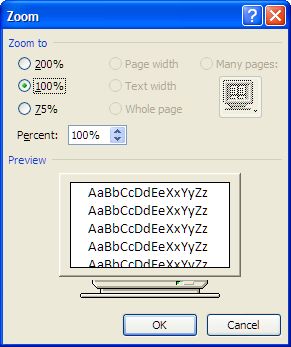
Then set the size to 100%.

Outlook 2007 Zoom dialog box

Mine ended up on 200% – not sure how. So I reset it back to 100% and things are back to normal.

And now that I have added it here, when it happens again, maybe I’ll remember how to fix it.